PASS THE OSAI CERT, Recon Part 2: Passive Reconnaissance of AI Systems
How much of an AI stack you can map before sending a single adversarial request: fingerprinting from HTTP responses, and mining public code and artifacts for models, endpoints, and secrets.
Part 1 gave you the map: the layers of an AI system and a taxonomy of what to enumerate at each. This post works the passive column of that taxonomy, the things you can learn without ever sending the target an adversarial request.
What “passive” means here, and where the line blurs
Passive reconnaissance is the recon a target has little or no reason to notice: you read public artifacts, you look at responses to the kind of ordinary request any visitor would send, and you mine third-party sources. You’re not fuzzing endpoints or feeding the model crafted prompts yet.
The useful distinction isn’t philosophical, it’s operational: passive recon doesn’t look like an attack in anyone’s logs, so do as much of it as you can before you make noise. On a real engagement, always work within your rules of engagement regardless of how you label a technique.
Fingerprinting AI stacks from HTTP responses
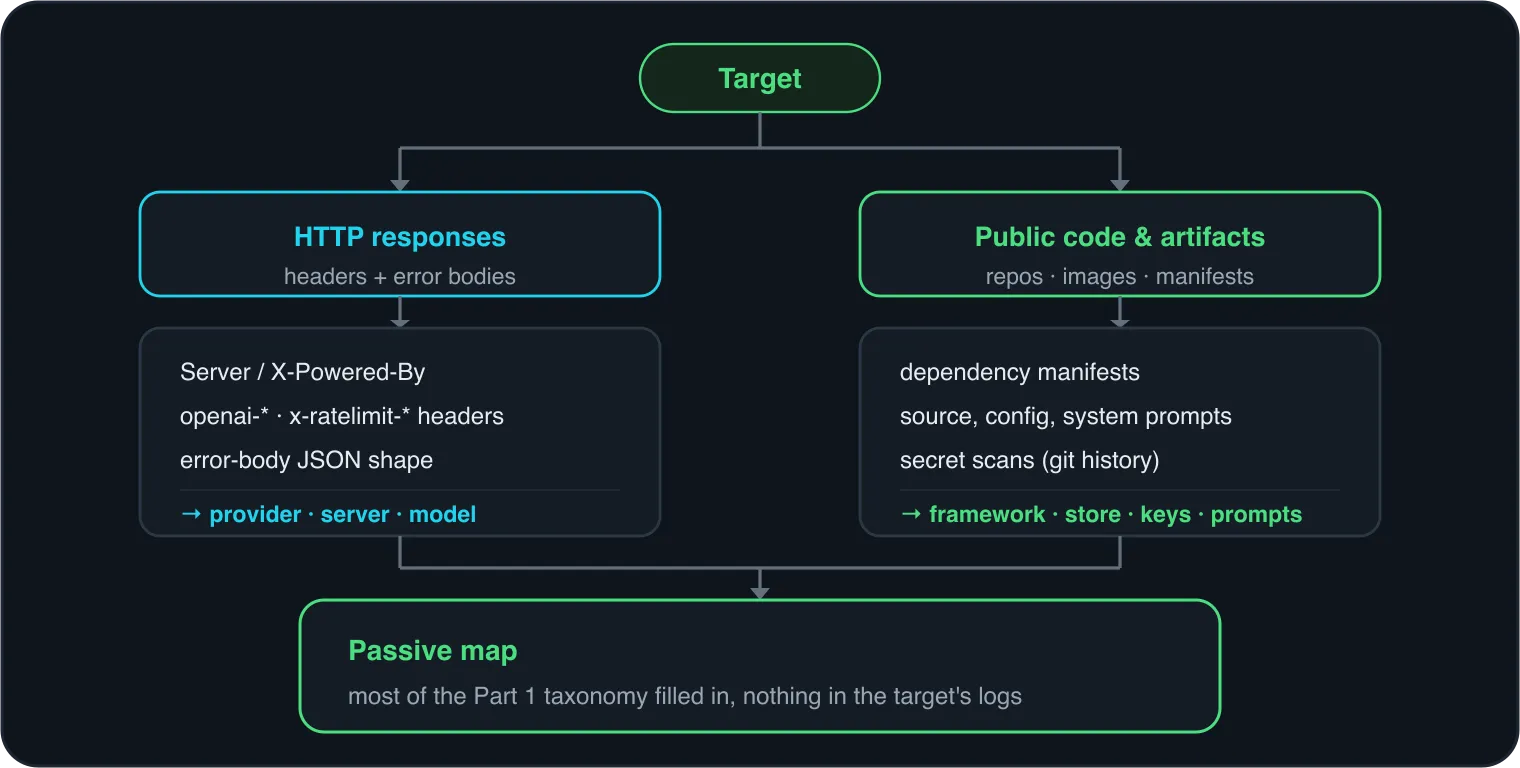
An AI API answers more than the question you asked. Its headers and its error bodies leak which provider, which server, and sometimes which model is behind it.
Start with the headers. A HEAD request or a header dump costs you almost nothing:
# Just the headers
curl -sI https://target.example/v1/chat/completions

# Full response headers, discard the body
curl -s -D - -o /dev/null https://target.example/v1/models
Do not over-read the status: /v1/chat/completions is usually POST-only and answers
HEAD with a 405, but the headers on that 405 are exactly the ones you want. A
self-hosted vLLM behind nginx often comes back looking like this:
HTTP/1.1 405 Method Not Allowed
server: uvicorn
content-type: application/json
What to read out of that:
ServerandX-Powered-By. The ordinary web tells.uvicornpoints at a Python ASGI app (very common for FastAPI-based LLM backends). A cloud load balancer or CDN string (cloudflare,AmazonS3, Google Front End) tells you where it’s hosted.- OpenAI-compatible tells. A huge share of LLM APIs, including self-hosted vLLM
and TGI, mimic OpenAI’s body shape but not its proprietary headers.
openai-organizationandopenai-processing-msare emitted by OpenAI’s own infrastructure, so their presence points at real OpenAI or a faithful proxy, while OpenAI-shaped JSON with those headers absent is a good tell for a self-hosted compatible server. Thex-ratelimit-*family (x-ratelimit-limit-requests,x-ratelimit-remaining-tokens) is an OpenAI naming convention that proxies often pass through, so read it the same way: “OpenAI or something imitating it,” not which. - Provider distinctions. Azure OpenAI deployments live under
*.openai.azure.comand take anapi-keyheader plus anapi-versionquery param, which looks different from vanilla OpenAI’sAuthorization: Bearer. A target proxying Anthropic tends to show it on the response side throughanthropic-ratelimit-*headers and arequest-id; theanthropic-versionheader is something the client sends, not something the response gives back. These small differences separate “they call OpenAI directly,” “they go through Azure,” and “they self-host.”
Now the error bodies, which are often more informative than the headers. Send a deliberately malformed but non-adversarial request (bad auth, missing field) and read the shape of the error, not just the status code:
curl -s https://target.example/v1/chat/completions \
  -H 'Content-Type: application/json' \
  -d '{"model":"x","messages":[]}'
OpenAI and OpenAI-compatible servers return a very recognizable JSON envelope:
{ "error": { "message": "...", "type": "invalid_request_error", "param": null, "code": null } }vLLM, TGI, and others each have their own wording and field layout for the same
conditions. The exact message text (“you must provide a model parameter”,
“Input validation error”, and so on) is often enough to name the server. This is
still passive in spirit: you’re sending the sort of malformed request a broken
client would send, not attacking the model.
Mining public code and artifacts
The single highest-yield passive source is the target’s own code and the artifacts around it. Teams shipping AI features often leak the entire architecture into public repos, container images, and package manifests far more than they realize. Using the fingerprinting above, you can first check whether the repo is public.
Dependency manifests name the stack. You don’t need to guess whether they use
LangChain when their requirements.txt says so. Look for:
requirements.txt,pyproject.toml,Pipfile(Python):langchain,llama-index,openai,anthropic,chromadb,qdrant-client,weaviate-client,sentence-transformers,vllm.package.json(Node):langchain,@langchain/*,openai,ai(Vercel’s SDK),@pinecone-database/pinecone.
Each dependency is a layer of your Part 1 diagram confirmed for free: the orchestration framework, the model client, the vector DB client, the embeddings library.
Source and config leak the specifics. Beyond the dependency list, the code
itself often contains model names (gpt-4o, claude-3-5-sonnet), endpoint URLs,
vector-DB collection names, chunking parameters, and, worst of all, system prompts
and prompt templates. A leaked system prompt is a recon jackpot: it tells you the
model’s instructions, its tools, and often its guardrails before you’ve sent a
single message.
Search deliberately, don’t browse. Use code search with targeted queries rather than reading repos by hand:
# GitHub code search patterns (web UI or `gh search code`)
org:targetorg  langchain
org:targetorg  OPENAI_API_KEY
org:targetorg  path:.env
"target.example" openai.azure.com
"pinecone" "environment" org:targetorg
Scan history for secrets, not just the current tree. Keys get committed and then “removed” in a later commit, but they stay in history. Tools built for this:
# Whole-history secret scan of a cloned repo
trufflehog git file://./target-repo

# Or gitleaks (older `gitleaks detect --source .` still works)
gitleaks git ./target-repo --report-format json
A live API key found this way isn’t just recon, it may be the whole engagement, but even a dead key confirms the provider and often the account structure.
Widen past GitHub. The same mindset applies to other artifact stores:
- Hugging Face. If the target self-hosts, their org or personal HF pages may list the exact models, datasets, and even Spaces (live Gradio demos) they run.
- Container images. A public image on Docker Hub or a registry can be pulled and its layers inspected for baked-in configs, model files, and environment defaults.
- PyPI / npm. An internal helper package published by accident exposes imports and endpoints.
- The Wayback Machine and Google cache. Old versions of a page or a config endpoint that has since been locked down are often still archived.
Building the passive picture
By the end of passive recon you should be able to fill in most of the taxonomy from Part 1 on paper: likely provider and model, probable orchestration framework, whether retrieval is in play and which vector store, and any secrets or system prompts that leaked. You did all of it without sending the target anything that looks like an attack.
That’s also exactly why it’s worth doing first. Everything in Part 3 is noisier and more detectable, so you want to walk into active recon already knowing most of the answers and using direct probes only to confirm them and fill the gaps.
Continue to Part 3: Active Reconnaissance of AI Systems →
This is an independent study guide. DSEC Labs is not affiliated with or endorsed by OffSec. Only run these techniques against systems you are authorized to test. DSEC Labs does this work professionally as AI red teaming.